
🔘 bKript™ Chat System
Gallery
 |  |
 |  |
Features Overview
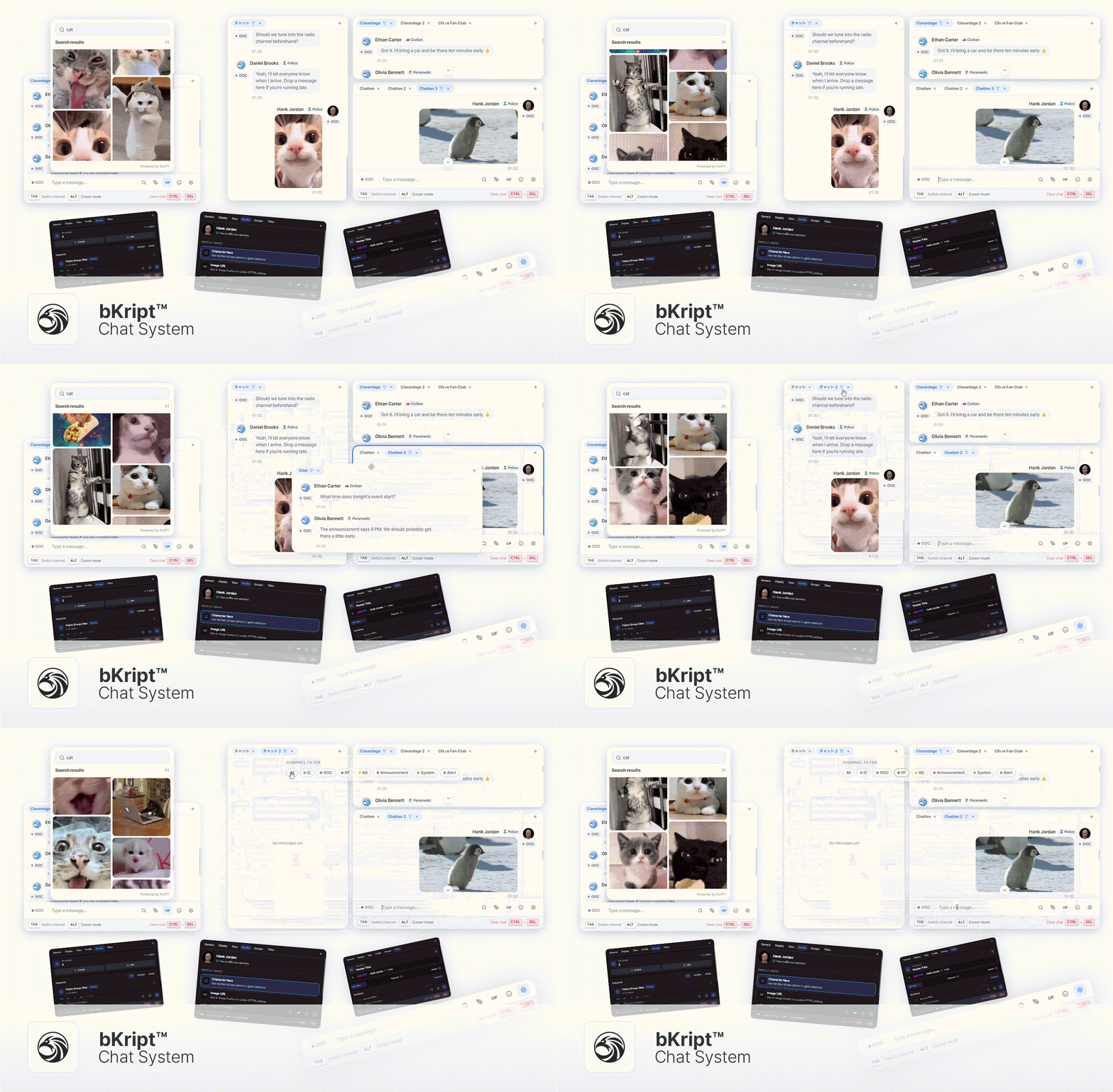
💬 Split Chat Window System
Players can separate chat channels into different tabs and windows.
Tabs can be dragged out into a new chat window or merged back into another window.
Each chat window can be moved and resized directly with the mouse.
Players can organize their chat layout depending on how they play.
For example, police or faction chat can stay on one side while global, local, or system messages stay on another.
Window position, size, and display settings are saved even after reconnecting.
🔎 Channel Filter System
Players can choose which channels appear in each chat window.
Instead of putting every message into one chat box, players can separate only the messages they actually need.
Important messages can be pinned.
Previous messages can be searched.
Each window can have its own opacity, auto-fade, timestamp display, and background image settings.
📢 Channel-Based Settings
Each channel can have its own behavior and enabled features.
Proximity chat can use distance limits and overhead chat bubbles.
Global or public channels can allow GIFs or sketches.
Advertisement channels can have usage costs and cooldowns.
Announcements, notifications, and system messages can be separated into dedicated channels.
GIF and sketch permissions can be configured per channel or group.
👥 Group Chat System
Players can create their own group chats and invite others with an invite code.
Invite codes can be viewed, regenerated, or disabled when the group no longer wants new members.
Group owners can rename the group, remove members, delete the group, or connect a Discord webhook.
Groups can also have custom roles with names, colors, hierarchy, and permissions.
Higher roles can manage lower roles based on the role hierarchy.
🚓 Auto-Matched Faction Chat
Faction groups can be matched automatically based on job, organization, group, grade, or permission.
When a player joins a faction, they can automatically enter the correct faction chat.
When they leave the faction, they can be removed automatically.
Specific grades or on-duty players can be allowed depending on your server settings.
Server-managed groups can block manual leaving or unwanted setting changes.
Faction-specific Discord webhooks can be connected for chat logs.
🎞️ GIF, Sketch, Mentions & Item Search
Players can search, preview, and send GIFs directly from the chat.
Simple drawings can be shared through the sketch system.
Players can mention online users with
@.Players can search their inventory and server item database with
#.Typing
/shows available commands and required arguments.Previously sent messages can be brought back with the arrow keys.
GIF search requires a separate KLIPY API key.
🧾 Discord Webhook Logging
Channels and groups can have separate Discord webhooks.
Group members with permission can manage webhook settings directly in-game.
Chat logs can include the channel or group name, author, unique identifier, server ID, time, and message content.
GIF messages can also be sent to Discord through webhooks.
🏷️ Image Title System
Players can apply for image titles from the chat settings.
Approved titles can be selected and used by the player.
Applications can be configured to cost money or items.
Depending on your server rules, titles can also be transferred to other players.
Admins can approve, reject, revoke, register, and grant titles directly.
Expired image links can be handled based on your server configuration.
🎨 Player Customization
Players can choose between light mode and dark mode.
The input box can be placed under the chat window or at the bottom of the screen.
Mention alerts, timestamps, tags, and display options can be configured by each player.
Players can customize how their chat profile is shown, including character face, image URL, or initials.
Window layout, theme, profile, and display settings are saved automatically.
👤 Chat Profile System
Player profile images are displayed directly in chat messages.
Players can set their chat profile using their current GTA V character face.
Players can also use a custom image URL as their profile picture.
If no image is set, the system can display initials as a fallback profile.
This makes chat messages easier to recognize and gives each player a more personal look.
🌐 i18n Multi-Language Support
Built with an i18n system for easier localization.
Default language support includes Korean and five additional languages.
UI text and chat-related strings can be translated for your own community.
🧩 Framework Support
Supports Qbox, QBCore, ESX, vRP, and Standalone setups.
Custom adapters are supported for server-specific integration.
Inventory integration is supported for item search features.
Channel tags, messages, and input UI can be styled through custom CSS to match your server.
🛠️ Made for Servers That Need More Than Basic Chat
Useful when important messages get buried by too many channels.
Useful when police, EMS, gangs, factions, or organizations need their own chat space.
Useful when you want to keep selected chat logs in Discord.
Useful when you want to replace multiple small chat resources with one clean UI.
Useful when players need their own layout and display settings.
🛠️ Build-Driven Architecture (Open Source)
Open-source version only.
Built with Vue 3 + TypeScript + Sass.
Developers can easily modify and bundle the project to fit their server.